> ## Documentation Index
> Fetch the complete documentation index at: https://help.peerlist.io/llms.txt
> Use this file to discover all available pages before exploring further.
# Identity Verification on Peerlist
> Verify your Peerlist account by providing a government-issued ID.
export const APP_PATHS = {
home: "/",
termConditions: '/legal/terms-and-conditions',
privacyPolicy: '/legal/privacy-policy',
codeOfConduct: '/legal/code-of-conduct',
contentPolicies: '/legal/content-policies',
verification: '/individual/peerlist-profile/verification',
verificationIdentity: '/individual/peerlist-profile/verification/identity',
verificationWorkplace: '/individual/peerlist-profile/verification/workplace',
verificationEducation: '/individual/peerlist-profile/verification/education',
verificationBootcamp: '/individual/peerlist-profile/verification/bootcamp',
launchpadIntroduction: '/individual/launchpad/introduction',
launchpadHowToLaunch: '/individual/launchpad/how-to-launch-a-project-on-peerlist-launchpad',
launchpadFAQs: '/individual/launchpad/frequently-asked-questions-about-spotlight-by-peerlist',
launchpadGuidelines: '/individual/launchpad/guidelines-faqs',
scrollWhatCanIPost: '/individual/scroll/what-can-i-post-on-peerlist-scroll',
peerlistStreaks: '/individual/peerlist-streaks',
companyCreateProfile: '/company/profile/create-profile',
companyFAQs: '/company/profile/faqs',
companyPostJob: '/company/hiring-jobs/post-a-job',
companyCareerSite: '/company/hiring-jobs/career-site'
};
export const SUPPORT_EMAIL = "support@peerlist.io";
export const STRIPE_SERVICE_PROVIDERS_LEGAL = "https://stripe.com/service-providers/legal";
export const STRIPE_ACCESS_VERIFICATION_RESULTS = "https://stripe.com/docs/identity/access-verification-results";
export const STRIPE_DATA_TRANSFERS = "https://stripe.com/privacy-center/legal#data-transfers";
export const STRIPE_VERIFICATION_CONSENT = "https://support.stripe.com/questions/common-questions-about-stripe-identity#verification-consent";
export const STRIPE_DOCUMENT_AVAILABILITY = "https://docs.stripe.com/identity/verification-checks?type=document#document-availability";
export const STRIPE_COMMON_QUESTIONS = "https://support.stripe.com/questions/common-questions-about-stripe-identity";
export const STRIPE_PERMISSIONS = "https://supportstripe.com/questions/common-questions-about-stripe-identity#verification-permissions";
export const STRIPE_SUBSCRIPTIONS = "https://docs.stripe.com/billing/subscriptions/creating";
export const STRIPE = "https://stripe.com/";
export const BIOMETRIC_IDENTIFIER = "https://en.wikipedia.org/wiki/Biometrics";
export const PEERLIST_EXTERNAL_LINKS = {
addProject: 'https://peerlist.io/user/projects/add-project',
addExperience: 'https://peerlist.io/user/resume/add-experience',
addEducation: 'https://peerlist.io/user/resume/add-education',
addCertification: 'https://peerlist.io/user/resume/add-certification',
addVolunteerWork: 'https://peerlist.io/user/resume/add-volunteer-work',
addCohort: 'https://peerlist.io/user/resume/add-cohort',
signup: 'https://peerlist.io/signup',
customDomain: 'https://peerlist.io/user/settings/custom-domain',
verification: 'https://peerlist.io/user/settings/verification',
projects: 'https://peerlist.io/projects',
launchpad: 'https://peerlist.io/launchpad',
account: "https://peerlist.io/user/settings/account"
};
export const STRIPE_IDENTITY = "https://stripe.com/identity";
 ## What is Identity Verification?
Identity verification confirms that a member's government-issued ID has been authenticated by Peerlist’s trusted verification partner ({STRIPE_IDENTITY}).
Identity Verification is not a mandatory step to create and complete your Peerlist profile. You can opt for Workplace and/or Education verification for free and get access to exclusive features.
## How to Verify Identity on Peerlist?
* Manage Verification modal: Open the right drawer menu by clicking on your profile picture on top-right and click on Verification or directly go to {PEERLIST_EXTERNAL_LINKS.verification}
You can open it by clicking on your display name on your profile.
## What is Identity Verification?
Identity verification confirms that a member's government-issued ID has been authenticated by Peerlist’s trusted verification partner ({STRIPE_IDENTITY}).
Identity Verification is not a mandatory step to create and complete your Peerlist profile. You can opt for Workplace and/or Education verification for free and get access to exclusive features.
## How to Verify Identity on Peerlist?
* Manage Verification modal: Open the right drawer menu by clicking on your profile picture on top-right and click on Verification or directly go to {PEERLIST_EXTERNAL_LINKS.verification}
You can open it by clicking on your display name on your profile.
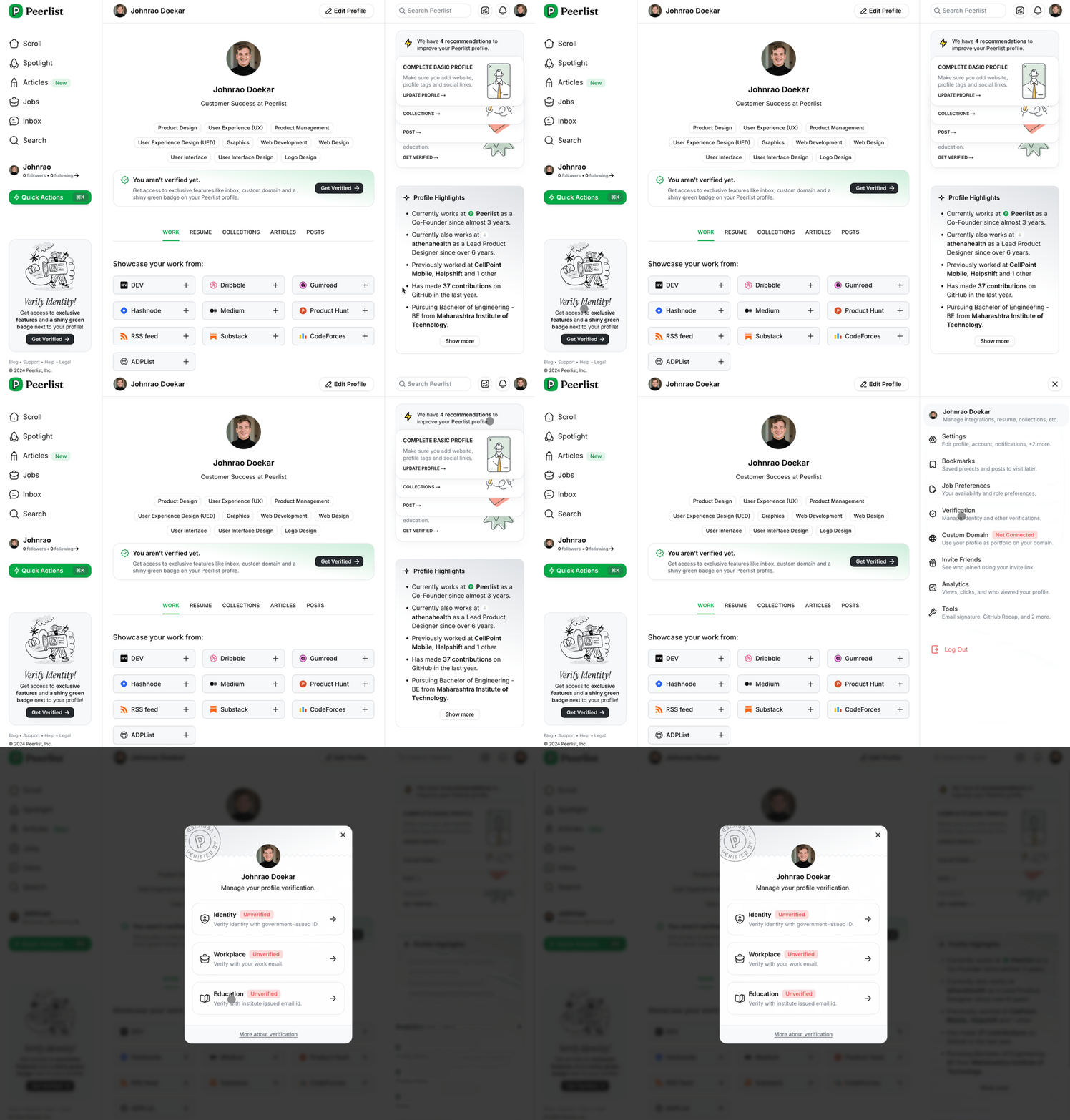 * Click on Identity.
* It will open the identity verification modal.
* Click on Identity.
* It will open the identity verification modal.
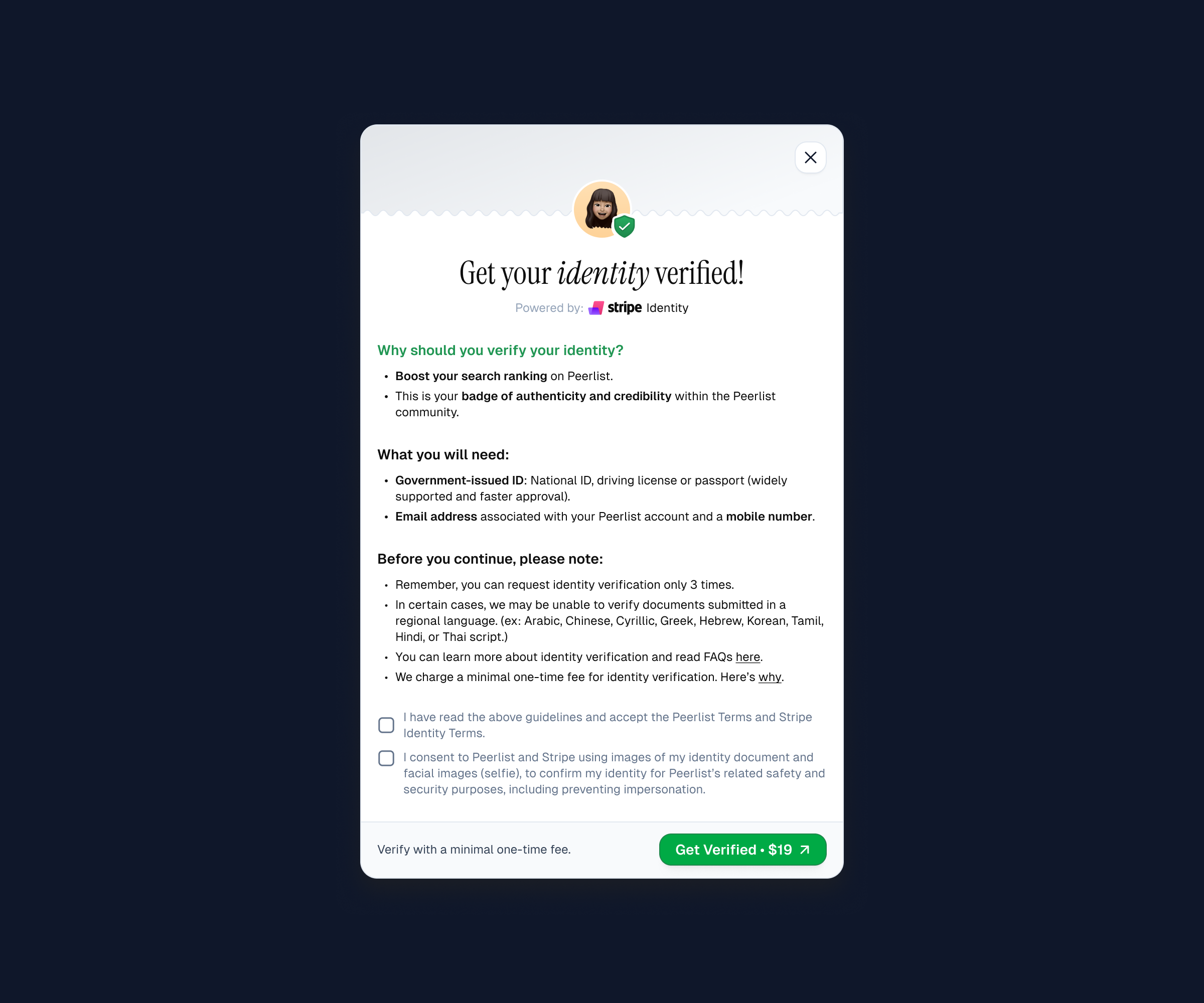 * Read the instructions carefully, accept the terms, provide consent, and continue.
* Click on Get Verified It will redirect you to Stripe.
* Return back to the modal and click on Get Verified button again.
* You will be redirected to Stripe Identity for verification flow.
* Keep your government-issue identity card ready.
* After completing the verification process, the outcome will be either Verified or Under Review, depending on the submitted document and whether additional scrutiny is required.
* In case of Under Review; you will hear about the verification status within 24 hours.
***
### Why is Identity Verification Chargeable?
* We charge a nominal one-time fee for identity verification, and here’s why:
* Ensuring Quality and Security: Identity verification is a critical and resource-intensive process, requiring robust measures to maintain accuracy, privacy, and security.
* Encouraging Serious Usage: Introducing a fee ensures that only serious users access this feature, maintaining its integrity and value.
* Preventing Abuse: A fee helps deter casual misuse that could jeopardize our partnership with the identity verification service provider, ensuring the feature remains available for everyone.
***
## FAQs
Peerlist Inc. works with Stripe to conduct identity verification online. Stripe builds technology that's used by millions of companies around the world such as Amazon, Google, and Zoom. Stripe helps with everything from accepting payments to managing subscriptions to verifying identities.
Stripe helps Peerlist Inc. confirm your identity by conducting the following checks:
1. **Stripe captures images of the front and back of your government-issued photo ID and reviews it to make sure that the document is authentic**. They've built an automated identity verification technology that looks for patterns to help determine if an ID document is real or fake. This process is like a bank teller checking your ID document to confirm that it's real.
2. **Stripe captures photos of your face and reviews them to confirm that the photo ID belongs to you**. It has built automated identity verification technology that uses distinctive physiological characteristics of your face (known as biometric identifiers) to match the photos of your face with the photo on the ID document. This process is similar to a bank teller confirming that the photo on your ID document is you based on your appearance – but it's a higher-tech and more accurate way to identify you as a unique person.
3. **Stripe collects your name, date of birth, and government ID number, and validates that it's real**. They'll check this information against a global set of databases to confirm that it exists.
Stripe asks for your consent before collecting and using your biometric information. It'll only use your verification data in accordance with the permissions you grant before starting the verification process, and based on its Privacy Policy.
Learn more about how handles and stores your data.
Before starting the verification process, here's what you need:
* **A valid government-issued photo ID document**. Not a photocopy or a picture of an ID document. Make sure that the ID document hasn't expired.
* **A device with a camera – use a mobile device if possible**. Cameras on mobile devices typically take higher-quality photos than a webcam.
The quality of the images you capture affects success rates dramatically. Below are a few best practices to help make sure that your verification succeeds:
* **Capture a clear image**. Make sure that the images aren't too dark or bright, and don't have a glare. Hold steady and allow your camera to focus to avoid blurry photos.
* **Don't block any part of your ID document in the image**. Ideally you should lay it flat to take the photo.
* **Don't block any part of your face**. Remove sunglasses, masks, or other accessories.
* **Find a location with ambient lighting**. Avoid spaces with strong overhead lights that cast a shadow on your face or ID document. Avoid sitting directly in front of a bright light which can wash out your face and add a glare to your ID document.
Document checks are available for most government issued documents (national IDs, driving licences and passports) from these countries.
You can request for deleting your identity verification data by simply sending an email to {SUPPORT_EMAIL}. Upon receiving a verifiable deletion request, Peerlist will completely delete your data within 72 hours.
As a reminder, if you gave only consent for Stripe to verify your identity and for fraud and security purposes, the biometric identifiers used to make the initial verification are fully removed from their systems within one year. If you gave consent to improve Stripe's verification technology, the biometric identifiers that are occasionally created to improve Stripe systems likewise within one year of creation.
When you initiate the identity verification process Stripe Identity, Peerlist only receives the final verification status—either "`cancelled`," "`verified`," or "`failed`"—after you complete the process. We only store the verification status in your own database. This means, no identity document or biometric data is transferred between Peerlist and Stripe servers.
**Peerlist does not store or create any copies of your identity data. All your information remains securely on Stripe's highly protected servers**.
Stripe Identity is built based on expertise they've developed from building a global infrastructure that handles hundreds of billions of dollars in payments annually. Stripe use learnings from building a bank-grade infrastructure to help keep verification data safe as well.
Stripe transfer verification data via TLS encrypted connections and use AES-256 encryption at rest. To prevent unauthorized access or use of verification data, they've implemented additional access controls to protect your confidential and sensitive information held by Stripe. This will keep the most sensitive data accessible only to those who have reason to access it.
Learn more about the safeguards Stripe have put in place to protect data transfers and control access.
Peerlist will have access to: captured images of the ID document, selfies, extracted data from the ID document, keyed-in information, and the verification result through the Stripe Dashboard and through the API with the use of restricted API keys.
**Stripe do not share the biometric identifiers used to verify you with Peerlist.**
As part of the ID verification process, Stripe may send information, including captured images, addresses, and other information provided to Stripe, to third party service providers for review. Stripe may work with third party service providers to check the submitted information against third party owned and managed data sources (such as government-issued databases and others) to help confirm the identity in question. This will only happen in situations where our automated verification technology cannot make a decision with confidence. These third parties are held to the same standards we use for sub-processors.
Learn more about the Stripe entities involved in processing your personal data.
* Read the instructions carefully, accept the terms, provide consent, and continue.
* Click on Get Verified It will redirect you to Stripe.
* Return back to the modal and click on Get Verified button again.
* You will be redirected to Stripe Identity for verification flow.
* Keep your government-issue identity card ready.
* After completing the verification process, the outcome will be either Verified or Under Review, depending on the submitted document and whether additional scrutiny is required.
* In case of Under Review; you will hear about the verification status within 24 hours.
***
### Why is Identity Verification Chargeable?
* We charge a nominal one-time fee for identity verification, and here’s why:
* Ensuring Quality and Security: Identity verification is a critical and resource-intensive process, requiring robust measures to maintain accuracy, privacy, and security.
* Encouraging Serious Usage: Introducing a fee ensures that only serious users access this feature, maintaining its integrity and value.
* Preventing Abuse: A fee helps deter casual misuse that could jeopardize our partnership with the identity verification service provider, ensuring the feature remains available for everyone.
***
## FAQs
Peerlist Inc. works with Stripe to conduct identity verification online. Stripe builds technology that's used by millions of companies around the world such as Amazon, Google, and Zoom. Stripe helps with everything from accepting payments to managing subscriptions to verifying identities.
Stripe helps Peerlist Inc. confirm your identity by conducting the following checks:
1. **Stripe captures images of the front and back of your government-issued photo ID and reviews it to make sure that the document is authentic**. They've built an automated identity verification technology that looks for patterns to help determine if an ID document is real or fake. This process is like a bank teller checking your ID document to confirm that it's real.
2. **Stripe captures photos of your face and reviews them to confirm that the photo ID belongs to you**. It has built automated identity verification technology that uses distinctive physiological characteristics of your face (known as biometric identifiers) to match the photos of your face with the photo on the ID document. This process is similar to a bank teller confirming that the photo on your ID document is you based on your appearance – but it's a higher-tech and more accurate way to identify you as a unique person.
3. **Stripe collects your name, date of birth, and government ID number, and validates that it's real**. They'll check this information against a global set of databases to confirm that it exists.
Stripe asks for your consent before collecting and using your biometric information. It'll only use your verification data in accordance with the permissions you grant before starting the verification process, and based on its Privacy Policy.
Learn more about how handles and stores your data.
Before starting the verification process, here's what you need:
* **A valid government-issued photo ID document**. Not a photocopy or a picture of an ID document. Make sure that the ID document hasn't expired.
* **A device with a camera – use a mobile device if possible**. Cameras on mobile devices typically take higher-quality photos than a webcam.
The quality of the images you capture affects success rates dramatically. Below are a few best practices to help make sure that your verification succeeds:
* **Capture a clear image**. Make sure that the images aren't too dark or bright, and don't have a glare. Hold steady and allow your camera to focus to avoid blurry photos.
* **Don't block any part of your ID document in the image**. Ideally you should lay it flat to take the photo.
* **Don't block any part of your face**. Remove sunglasses, masks, or other accessories.
* **Find a location with ambient lighting**. Avoid spaces with strong overhead lights that cast a shadow on your face or ID document. Avoid sitting directly in front of a bright light which can wash out your face and add a glare to your ID document.
Document checks are available for most government issued documents (national IDs, driving licences and passports) from these countries.
You can request for deleting your identity verification data by simply sending an email to {SUPPORT_EMAIL}. Upon receiving a verifiable deletion request, Peerlist will completely delete your data within 72 hours.
As a reminder, if you gave only consent for Stripe to verify your identity and for fraud and security purposes, the biometric identifiers used to make the initial verification are fully removed from their systems within one year. If you gave consent to improve Stripe's verification technology, the biometric identifiers that are occasionally created to improve Stripe systems likewise within one year of creation.
When you initiate the identity verification process Stripe Identity, Peerlist only receives the final verification status—either "`cancelled`," "`verified`," or "`failed`"—after you complete the process. We only store the verification status in your own database. This means, no identity document or biometric data is transferred between Peerlist and Stripe servers.
**Peerlist does not store or create any copies of your identity data. All your information remains securely on Stripe's highly protected servers**.
Stripe Identity is built based on expertise they've developed from building a global infrastructure that handles hundreds of billions of dollars in payments annually. Stripe use learnings from building a bank-grade infrastructure to help keep verification data safe as well.
Stripe transfer verification data via TLS encrypted connections and use AES-256 encryption at rest. To prevent unauthorized access or use of verification data, they've implemented additional access controls to protect your confidential and sensitive information held by Stripe. This will keep the most sensitive data accessible only to those who have reason to access it.
Learn more about the safeguards Stripe have put in place to protect data transfers and control access.
Peerlist will have access to: captured images of the ID document, selfies, extracted data from the ID document, keyed-in information, and the verification result through the Stripe Dashboard and through the API with the use of restricted API keys.
**Stripe do not share the biometric identifiers used to verify you with Peerlist.**
As part of the ID verification process, Stripe may send information, including captured images, addresses, and other information provided to Stripe, to third party service providers for review. Stripe may work with third party service providers to check the submitted information against third party owned and managed data sources (such as government-issued databases and others) to help confirm the identity in question. This will only happen in situations where our automated verification technology cannot make a decision with confidence. These third parties are held to the same standards we use for sub-processors.
Learn more about the Stripe entities involved in processing your personal data.